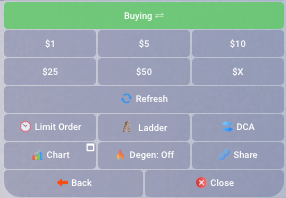
The amounts below are examples, not recommendations. Start with an amount you would not mind losing — the minimum trade is $1.
1
Start the bot
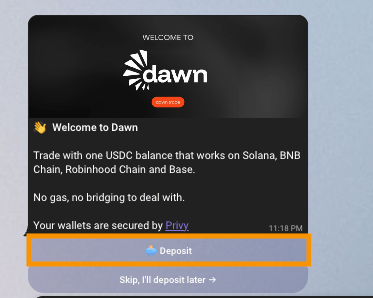
Open Dawn in Telegram and tap Start, or send 

Dawn creates your first profile and your first wallet. The wallet is a pair of addresses — one EVM, one Solana — created and secured by Privy. Nobody at Dawn holds your keys, and you can export them whenever you like.The home screen shows your Balance, your Portfolio, and the buttons for everything else.
/start.
2
Add USDC
Tap Deposit or send 
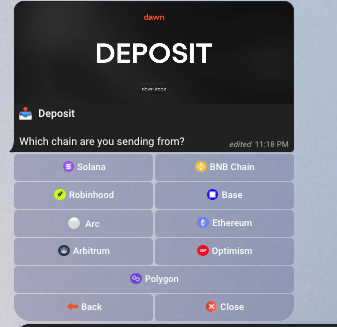
Choose a chain to send funds from. 
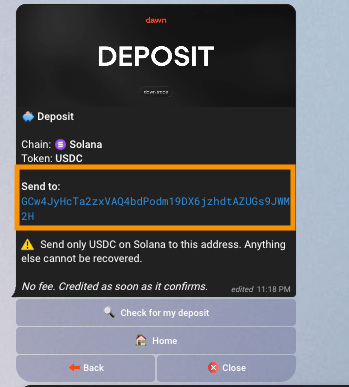
Dawn shows an address and a minimum. Copy the address, and in the wallet or exchange you are sending from, select the same token and the same network.
USDC on Solana is the most direct route: it lands on your balance with no fee and no conversion. Everything else is swapped and bridged for you, and the panel tells you roughly how long that takes.Wait for Deposit received, then check that Balance has gone up.
/deposit, then pick the chain you are sending from and the token you are sending.

Dawn shows an address and a minimum. Copy the address, and in the wallet or exchange you are sending from, select the same token and the same network.

3
Open a coin
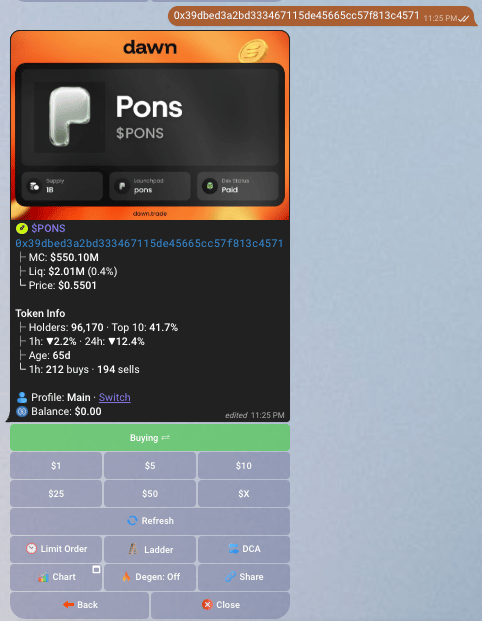
Paste the coin’s contract address into the chat.Dawn finds it, works out which chain it is on, and replies with its panel: market cap, liquidity, the token’s own checks, and a row of buy buttons. If the same address exists on more than one chain, Dawn asks which one you meant.
Check the address and the chain before you go further. You can also search by ticker — send

$PEPE — but an address is exact and a ticker is not.4
Buy
Tap one of the dollar buttons. The default set is $1 · $5 · $10 · $25 · $50, and $x lets you type any amount.
Dawn quotes, signs and submits. The card updates itself through submitted to filled, and shows what you spent and what you received. If the trade cannot fill inside your slippage, it is refunded and your USDC stays where it was.

5
Find it in your portfolio
Send
/portfolio, or tap Portfolio on the home screen.Your coin is listed with what you put in, what it is worth now, and its PnL. Tap it to reopen the panel and buy more, sell, or set an order.What next
Protect the position
Set a take-profit and a stop-loss so an exit happens without you watching.
Sell some of it
Sell a share of what you hold, or all of it.
Tune your settings
Slippage, buy buttons, auto buy, gas and guardrails.
Earn on every trade
Cashback pays part of your trading fee back to you, starting at 25%.
If the buy doesn’t go through
More in Troubleshooting.